
Javelin Plant and Delivery Analysis

Upload a strict side-view javelin clip to detect the block frame, release frame, and the plant-to-delivery mechanics that turn run-up speed into a braced, explosive throw.

AlphaPeak logo

Record a clean side view at 60 fps, capture the block and release, and read the report in the same order the app scores it.

The javelin app breaks the throw into phase timing, block mechanics, rotational transfer, and delivery and release quality. Clean capture is what makes the event detection and the coaching cues trustworthy.

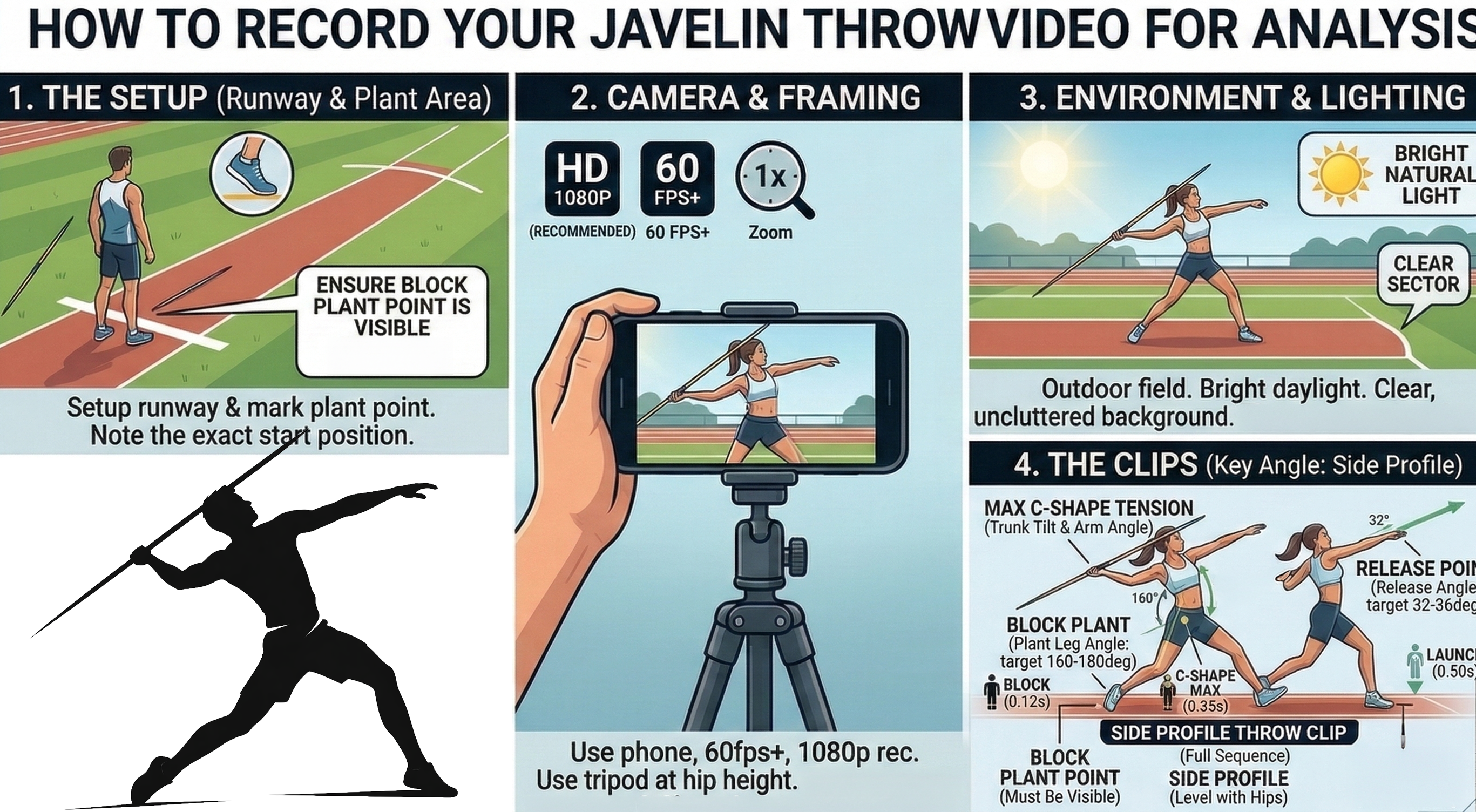
Javelin throw recording guide and phase checkpoints

Part 1: Record The Throw

Use a steady side-view clip at 1080p and 60 fps so the app can detect both the block and the release.

This analysis is event-based. If the block-foot strike or the release frame is missed, the downstream metrics and coaching cues degrade quickly.

  • 1. Side-view only: place the camera 90 degrees to the throwing direction. Do not shoot from behind or from the front.
  • 2. Minimum settings: record at 1080p and 60 fps. Higher frame rate is fine if the clip stays bright and clear.
  • 3. Capture the whole delivery: start before the final crossover so the app sees the approach into the block, and keep recording through release and follow-through.
  • 4. Keep the full body visible: the thrower, block leg, throwing arm, and javelin should stay in frame the entire time.
  • 5. Use a tripod and clean lighting: no handheld shake, no zooming during the throw, and enough contrast for the body and javelin to stand out.

After upload, choose the correct throwing arm in the app. The opposite leg is treated as the block leg, so that selection affects how the report is interpreted.
Javelin report card and metric interpretation

Part 2: Read The Report

Use the color-coded cards to read phase timing, bracing, rotational transfer, and release quality.

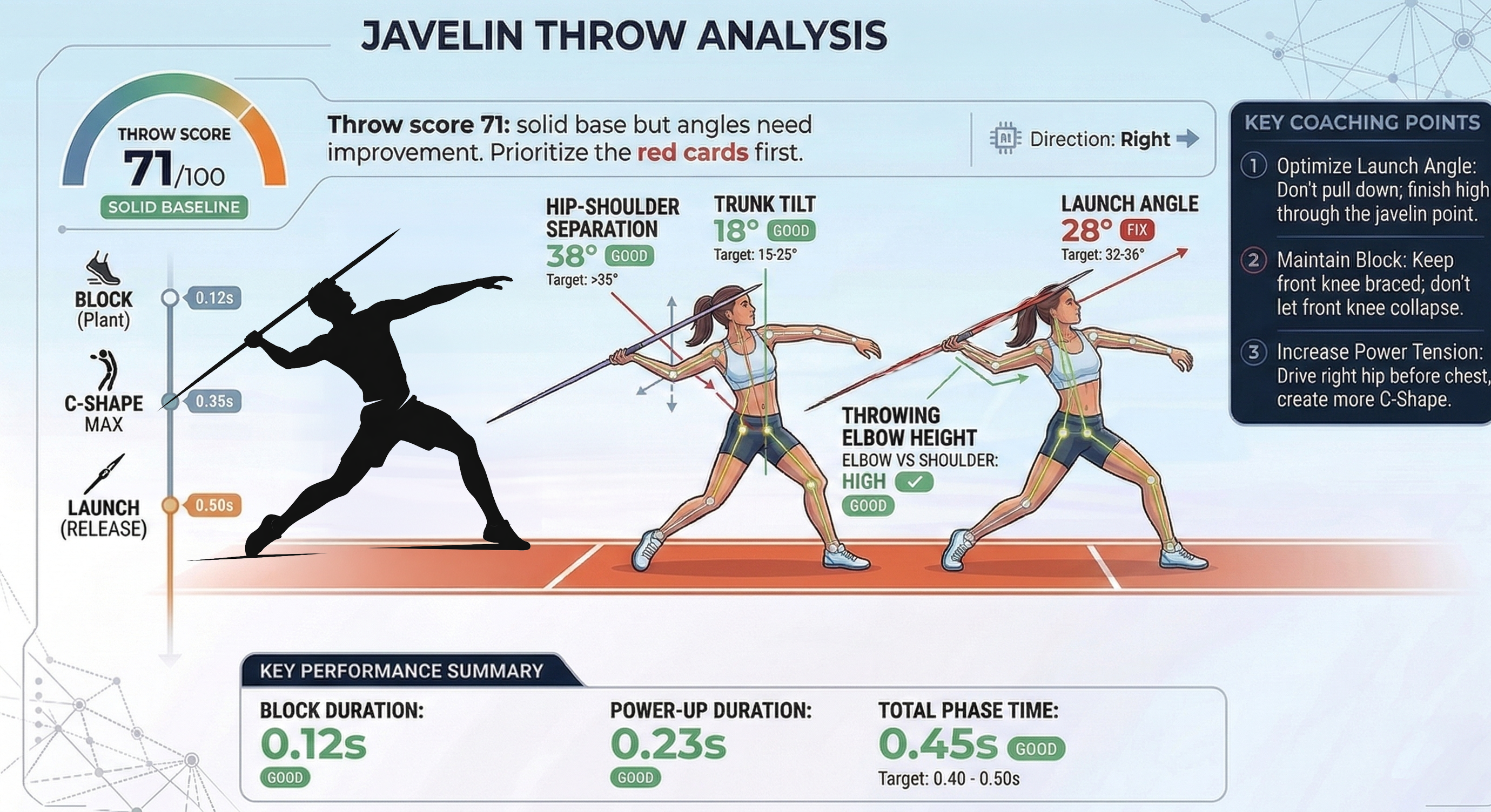
The attached sample PDF shows the same card logic used in the app. In that example, the Block-to-Release Window is 150 ms, which scores as Okay because the strongest target band is 100-140 ms.

Block-to-Release Window

Target 100-140 ms

Time from block-foot strike to release. Under 90 ms often looks rushed; over 160 ms usually leaks stored tension before release.

Block Leg Angle

Target 160-180°

The front side should brace like a post at the block. Below 150° usually means the lead knee is collapsing instead of stopping momentum.

Trunk Tilt at Block

Target 15-25° back

Backward lean preserves the reverse-C shape and keeps the chest from getting over the block too early.

Hip-Shoulder Separation

Peak 18°+ | <8° at release

The hips should open before the shoulders, then the gap should snap shut into release. That is the main elastic storage pattern in the delivery.

Throwing Elbow Height

At or above shoulder line

A high elbow preserves the long pull over the top. Negative elbow height means the arm dropped below the shoulder line.

Release Angle

Target 32-36°

Align the manual guide to the javelin at release before trusting the score. Below 28° is often too flat; above 40° usually stalls the throw.

Green means keep it, amber means close, and red is the first priority. Start with the red cards before you tune the details.

Part 3: Apply The Coaching Cues

Use the metric cards and the video together, change one or two things, and then re-test.

The report PDF expands each metric into a summary, a target range, why it matters, and coaching cues. The quickest improvement usually comes from addressing the same themes shown in the sample graphic: maintain the block, create more separation, and finish the release path correctly.

Best workflow: review the card, turn on the matching overlay in the app, make one clear adjustment, then capture another side-view throw with the same camera setup.

Javelin coaching points and performance summary