
Golf Swing Analysis

Upload a strict face-on or down-the-line golf swing clip to detect address, top, and impact, then score the posture, sway, width, and sequencing cues that shape an efficient strike.

AlphaPeak logo

Record one clean swing at 60 fps+, capture address through finish, and read the report in the same order the app scores it.

The golf app uses the same expandable metric cards that appear in the shareable PDF report. Good capture and correct phase markers are what make the posture, sway, and sequencing cues worth trusting.

Golf swing recording guide with face-on and down-the-line camera setup

Part 1: Record The Swing

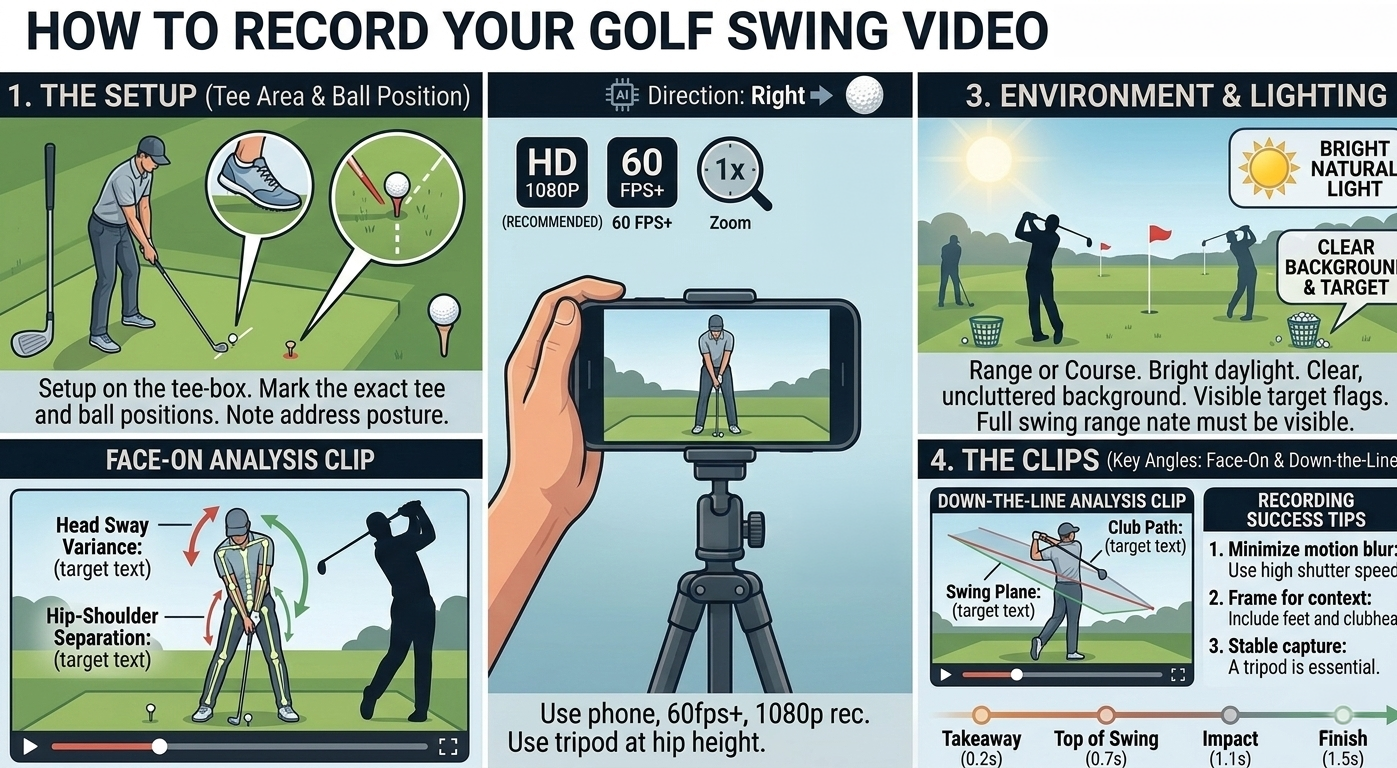
Use one clean camera view, 1080p, 60 fps+, and a tripod at about hip height so the app can detect address, top, and impact.

The report is phase-based. If the setup frame, transition, or impact frame is blurred, cropped, or shot from the wrong angle, the rest of the scorecard drifts with it.

  • 1. Pick one approved angle: record either a strict face-on clip or a strict down-the-line clip. Do not stand halfway between the two.
  • 2. Keep the camera simple: use 1080p, 60 fps or higher, 1x zoom, and a stable tripod instead of handheld video.
  • 3. Frame the whole motion: keep the golfer, hands, club, and ball or tee area visible from the final quiet address position through finish.
  • 4. Start early and stop late: begin before the takeaway and record through impact and follow-through so the app can time backswing and downswing duration.
  • 5. Use bright, clean conditions: favor daylight or strong lighting, a clear background, and a visible target line so the body and club stand out.

After upload, set both Golfer Handedness and Camera View correctly in the app. Those two selections affect overlays, card labels, and how the swing is interpreted.
Golf analysis report cards for swing interpretation

Part 2: Read The Report

Confirm the phase markers first, then use the color-coded cards to read backswing structure, transition sequencing, and impact posture.

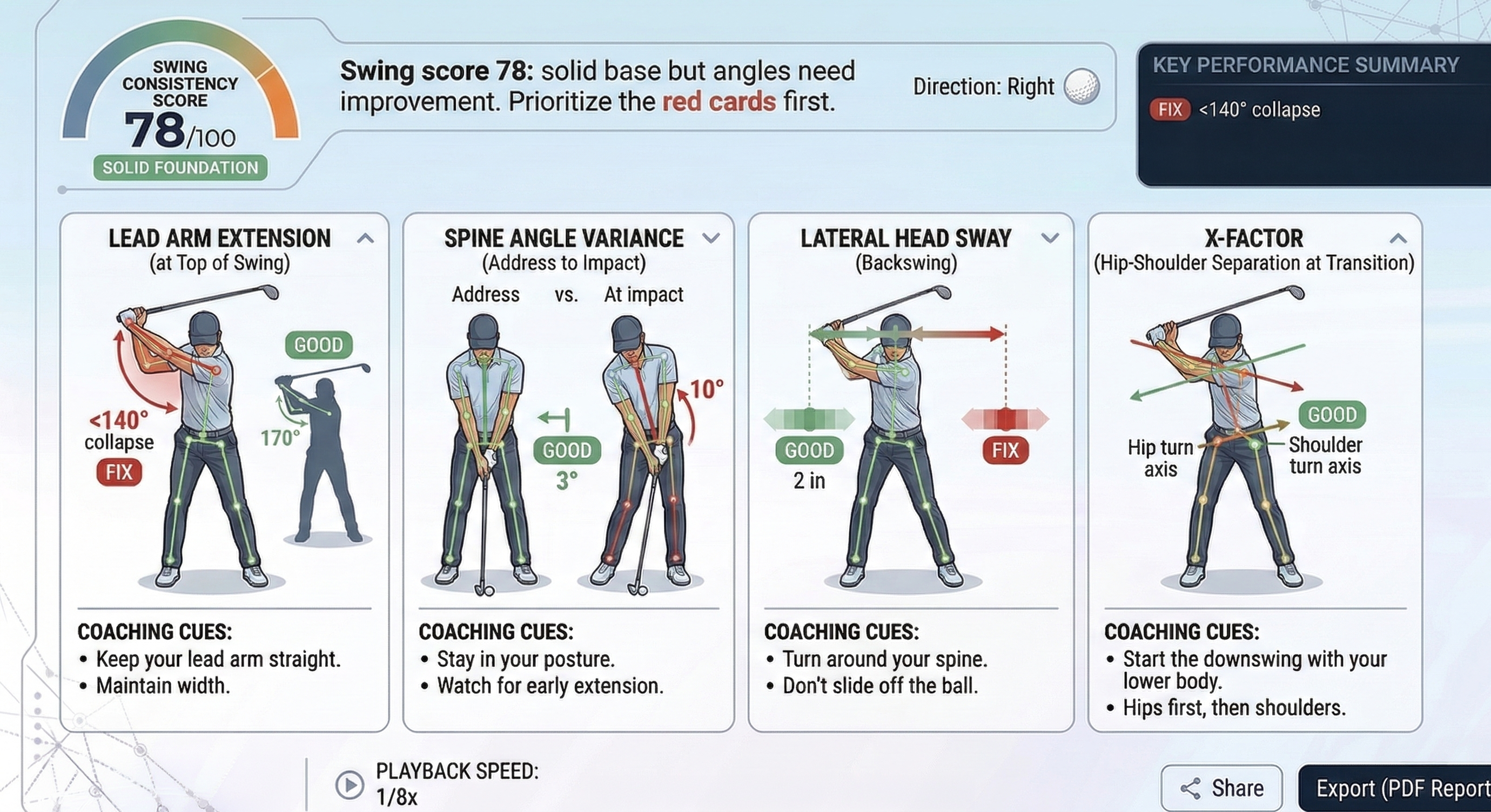
In the sample report, the app detects address, top, and impact, then scores the same cards you can expand in-app. That example shows Lead Arm Extension at 69.2° as Fix, Trail Knee Flex at 1.0° loss as Good, Lateral Head Sway at 3.8 in as Okay, X-Factor at 33.5° as Good, and Spine Angle Variance at 6.4° as Okay.

Address, Top, and Impact

Confirm at 1/8x playback

Address should be the final quiet setup frame, top should be where the hands finish the coil and reverse, and impact should land at the highest-speed return before follow-through.

Lead Arm Extension

Target 160-180°

A long lead arm preserves width and coil. Yellow is 140-159°; red is under 140° and usually means the backswing collapsed.

Trail Knee Flex Loss

Target 0-5° loss

The trail knee should stay flexed as the player loads into the trail instep. Bigger losses usually flatten the turn and leak pressure.

Lateral Head Sway

Target under 2 in

The swing needs rotation, not a full-body slide. Two to four inches is close; above four inches usually changes pressure and low-point control.

X-Factor

Target about 12°+

This 2D estimate checks whether the hips begin unwinding while the shoulders stay coiled. Six to eleven degrees is close; under six is the main sequencing warning.

Spine Angle Variance

Target 0-5° variance

Stable posture keeps the player rotating around the original tilt. Six to ten degrees is close; above ten is a strong early-extension flag.

Green means keep it, amber means close, and red is the first priority. Each card can also show an overlay on the video so you can inspect the same metric frame by frame.

Part 3: Use Overrides And Coaching Cues

Lock the right frames, inspect the matching overlay, and change one swing theme at a time before you re-test.

The app lets you override Address, Top, and Impact with Use Current or return to Use Auto. As soon as those markers move, the backswing and downswing durations update, and the rest of the metric cards stay aligned to the new frames.

Best workflow: fix the red card first, turn on the matching overlay, make one clear adjustment, and record another swing from the same camera setup before comparing scores.

Golf report summary with coaching priorities